Scoop · Drops of Memories

The sites you follow, in one place.

Scoop gathers what's new from the papers, blogs and channels you care about and lines it up, newest first. All you need is the site's address: Scoop finds the feed.

App Store soon Microsoft Store soon

Scoop is in testing on iPhone, iPad and Mac. It's coming soon to the App Store and the Microsoft Store.

  • No account
  • No ads
  • Your data stays on your device
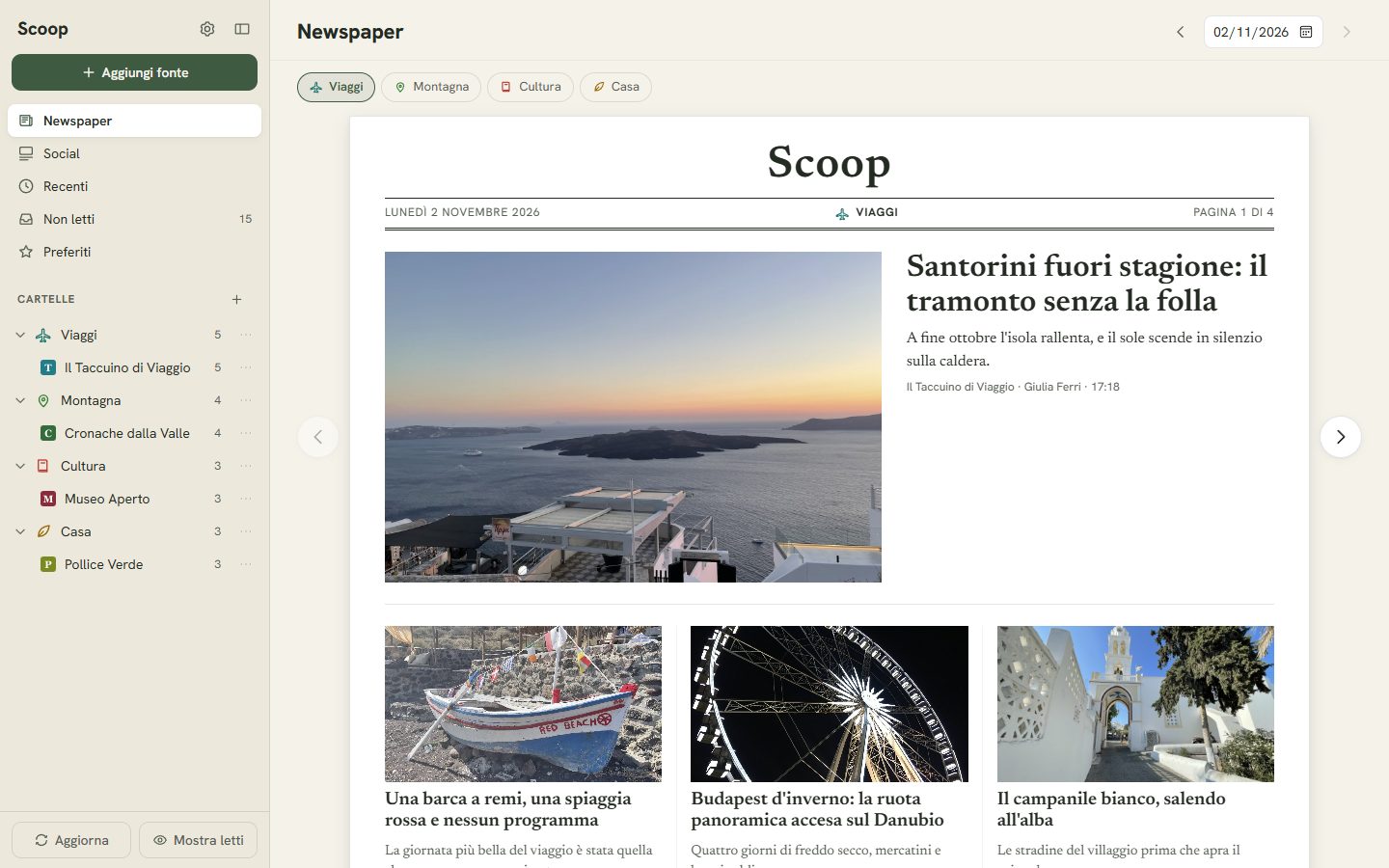
Scoop on Windows, Newspaper view: the latest from the Viaggi (Travel) folder laid out like a newspaper's front page
Scoop on a phone, Social view: articles from your sources scroll one after another, with photo, title and actions
Newspaper on the PC, Social on the phone. The screens are real; sources and articles are test data, in Italian.

To find out what's new you open ten tabs. Every morning.

The paper, a colleague's blog, the channel you follow, your town's website. Each has its own page, its own banners and its own way of hiding the latest story. Social media shows you some of it, picked by someone else.

Almost all of these sites publish a feed: an up-to-date list of what they put out. Scoop reads them for you and shows you only what you haven't seen yet.

Newspaper

The day's news, laid out like a newspaper

Each folder becomes a daily paper: the latest article up top with a big photo, the others in columns below. Turn the pages with the arrows or a swipe, and use the calendar to go back to earlier days.

Scoop on Windows, Newspaper view: the latest from the Viaggi (Travel) folder laid out like a newspaper's front page

Social

All your sources in a single stream

On your phone, the unread articles from all your sources scroll one after another, newest first. Tap “More…” to read the whole article; the X takes it out of the stream, with “Undo” if you change your mind.

Scoop on a phone, Social view: articles from your sources scroll one after another, with photo, title and actions

A feed reader that doesn't ask you to know what a feed is.

Add

Just the address

Paste the site's address and Scoop finds the feed on its own. It also recognises YouTube channels, Reddit, Substack, Mastodon and Bluesky.

Organise

Your folders

Put your sources in folders like News, Work or Town and drag them around. Recent, Unread and Starred are always at the top.

Browse

List, Cards, Magazine, Newspaper, Social

Read each folder the way you like: a list of headlines, cards with pictures or a magazine page. Newspaper lays out the day's news like a front page. Social scrolls it one item after another, like posts: open what interests you and dismiss the rest with an X.

Read

The whole article, inside the app

Open an article and read it on a clean page, with its photos and videos. If the feed only carries the opening, Scoop fetches the full text. The original page is one tap away.

Anywhere

By touch or by keyboard

On your phone you swipe from one article to the next, on your computer you use the arrow keys. You choose the theme, light or dark, and the text size.

Take them along

Your sources go where you go

Coming from another feed reader? Import its OPML file and all your sources are back. The same file takes them elsewhere, if you ever want to leave.

You're up and running in a minute

No sign-up and no list of sources to pick from at the start: begin with the site you open most.

01

Paste an address

The one you read most. Scoop finds the feed and downloads the latest stories.

02

Put it in a folder

Or leave it where it is: folders help once you have lots of sources.

03

Read

What you've read fades out, starred articles stay until you remove them.

What you read is your business.

Scoop has no server and doesn't ask for an account. Only your device knows your sources.

No Alemik server

Scoop downloads feeds straight from the sites you follow. Alemik never sees your sources or what you open.

Synced through your iCloud

On iPhone, iPad and Mac your folders, sources, read and starred articles move between devices through your private iCloud. On Windows they stay on the PC.

No telemetry

No tracking and no ads in the app. The details are in the Privacy Policy.

Scoop is coming soon.

Right now it's in testing on iPhone, iPad and Mac, and the Windows version is on its way. Once it's in the stores, the buttons below will take you there.

App Store soon Microsoft Store soon